

DPS Digital T&L
@dpsdtl
Followers
292
Following
500
Media
75
Statuses
314

So excited to showcase @nearpod to @OakGroveDPS educators!!! Let the learning begin!! @DPS_K12C_I @DurhamPublicSch #DigitalLearning
1
3
12
Sandy Ridge Elementary rolling out the red carpet for their students! Welcome back! @SREinDurham
@DurhamPublicSch
@DPS_K12C_I
0
0
3
Students having fun learning by moving, exploring, experimenting and so much more! DPS #OperationSummerLearning
@DurhamPublicSch
@DPS_K12C_I
0
2
4

Ignite is thrilled to support this exciting partnership. Students grades 7-11 can learn to code alongside Duke Computer Science Sidekicks! Register here to get more information for a student you know: https://t.co/Gd5QxPT8Qn…
1
4
8
Read the @DurhamPublicSch Digital Teaching & Learning Newsletter (November 11, 2020 Edition)! 📰 #TechTip
#Canvas Resources DPS Goal 1D Results #TPACK Learn More- https://t.co/hs0J8YbJyc
#WeAreDPS
@DPS_K12C_I
@tech_edu

docs.google.com
DPS Digital Teaching & Learning Newsletter If you are having trouble viewing this email, click here. Find past issues here. #WeAreDPS NOVEMBER 11, 2020 This is issue number 63. Below are short bits...
0
1
3
"There are lies, damn lies, and statistics." We live in a world of data. The tools exist to make sense of it yourself. Maybe the most powerful tool in Google Sheets is the QUERY function. Learn More- https://t.co/q1Ze3RDEx8
#KnowledgeIsPower
@DPS_K12C_I
@tech_edu
0
1
0
Got Slides you want to embed into a Canvas page? Here you go! Learn More- https://t.co/xDEqosXjPh
#Canvas
@DPS_K12C_I
@tech_edu
@ncdpiDTL
0
0
0
Read the @DurhamPublicSch Digital Teaching & Learning Newsletter (October 29, 2020 Edition)! 📰 https://t.co/5qCgfVRNf2
#TechTip
#Canvas Resources #ISTE Standards Ready, Set, App! Challenge NC STEM Connect 2020 Conference NC Computing Ed Summit @DPS_K12C_I
@tech_edu
@ncdpiDTL

docs.google.com
DPS Digital Teaching & Learning Newsletter If you are having trouble viewing this email, click here. Find past issues here. #WeAreDPS OCTOBER 29, 2020 This is issue number 62. Below are short bits of...
0
0
0
An ounce of prevention is worth a pound of cure, right? Use that principle to get ahead of your emails using Outlook Inbox Rules. Learn More- https://t.co/IgwRyiQLA4
#TechTips
@DPS_K12C_I
@tech_edu
@DurhamPublicSch
@ncdpiDTL
0
0
3
It's known that #NCWiseOwl has the most amazing collection of resources. But did you know that you can send its articles to #GoogleDrive for student activities and research? https://t.co/5rlWj4sWKJ
#ISTE #KnowledgeConstructor
@DPS_K12C_I
@tech_edu
@DurhamPublicSch
@ncdpiDTL
0
6
7
Did you know you can make GIFs with #GoogleSlides? Yep. It is super simple with Tall Tweets ( https://t.co/3veDprm3w6)! Learn More- https://t.co/41ldJngHBX
#TechTips
@DPS_K12C_I
@tech_edu
@DurhamPublicSch
0
1
5
🖱️ Every click adds up! Outlook users can create Calendar events directly from emails. 1. Click message 2. Drag to Calendar 3. Edit Details 4. Save & Close! #TechTips
@DPS_K12C_I
@tech_edu
@DurhamPublicSch
0
0
0

0
1
11
One feature I ♥ about #GoogleSheets is the ability to import data from other spreadsheets allowing you to share the data securely in real time to various groups. Learn More- https://t.co/VoVXdQAfhn
#ISTE #DigitalLearning
@DPS_K12C_I
@tech_edu
@DurhamPublicSch
0
0
0
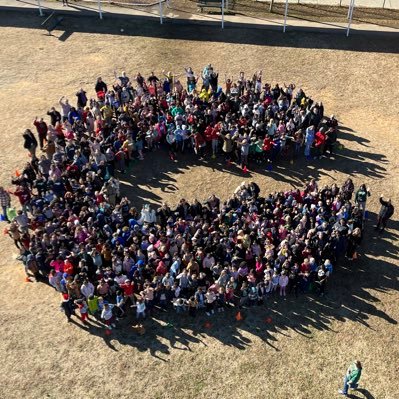
Today we celebrated Yoshi’s life by releasing environmentally friendly balloons and tying ribbons around the tree we dedicated to her memory. Thank you to all who joined us. #CESproudDPS #WeAreDPS @DurhamPublicSch
0
7
37
⬆ student enagement by giving them opportunities to create products to show their understanding. Fun example- have students animate #Slides! https://t.co/41ldJngHBX Learn More- https://t.co/2ARCzPpJkX
#ISTE #KnowledgeConstructor
@DPS_K12C_I
@tech_edu
@DurhamPublicSch
drive.google.com
0
3
6
Google My Maps are an often overlooked tool in Google Drive that can be used across subject areas. Have students tell stories through geo markers. #ISTE
@DPS_K12C_I
@tech_edu
@DurhamPublicSch
https://t.co/qON2FHP5V2
0
1
4
Screencastify is an amazing (and amazingly simple) tool- run completely in your Chrome browser and saves automatically to Google Drive. You can even create GIFs! #DigitalSkills @DPS_K12C_I
@tech_edu
@DurhamPublicSch
https://t.co/lnI0Lnidrz
0
1
5
When designing in #CanvasLMS use the Student View to see what it will look like for your students. #CANVAS #TechTips @DurhamPublicSch
https://t.co/shHfi64onG
0
1
3