

TIL Performance Tips ⚡️
@TILperf
Followers
127
Following
328
Media
21
Statuses
52
Today I Learned: Web Performance Tips
A Faster Web
Joined May 2020

Part 2/3 of my series "HTTP/3 from A to Z" is now online. In it, I discuss #HTTP3 and #QUIC's performance features in technical detail and nuance. Learn why the new protocols certainly improve things but often don't entirely solve problems @smashingmag: https://t.co/z1u6dy7qF5
3
92
334
Google Fonts now offers 112 variable fonts. A great way to save additional requests and many KBs: https://t.co/nMUURuDBEY
https://t.co/g7uSRw6JgS

fonts.google.com
Making the web more beautiful, fast, and open through great typography
If you are going to use custom fonts with multiple weights and styles, try using a Variable Font. It will save extra HTTP requests and usually is half the file size. Currently, Google Fonts offers ~50 Variable fonts to use today: https://t.co/NgWtLJrRwZ
0
3
0
A great breakdown by @TheGreenGreek on render blocking resources and the critical rendering path.
sia.codes
Is Lighthouse telling you to eliminate render-blocking resources? Learn what this means, why it's important, and how to fix it in your HTML, CSS, and JavaScript.
0
1
1
Prevent hidden images from loading altogether by using both loading=lazy and hidden attributes. Otherwise hidden images will load in the background at low priority. This works for all browsers that support native lazy loading: https://t.co/M1iAHLxRuX
0
2
4

I've been doing a bunch of web performance audits recently, here are the top 10 problems I've seen
8
15
95
Google Fonts now offers 86 variable fonts. A great way to save additional requests and many KBs: https://t.co/nMUURuDBEY
fonts.google.com
Making the web more beautiful, fast, and open through great typography
If you are going to use custom fonts with multiple weights and styles, try using a Variable Font. It will save extra HTTP requests and usually is half the file size. Currently, Google Fonts offers ~50 Variable fonts to use today: https://t.co/NgWtLJrRwZ
0
0
2

#webperf tip of the day. Make sure you have the correct `cache-control` headers on your `favicon.ico` so your CDN can cache it correctly. This missing header caused 370,000 https://t.co/CcU3PLPTpj origin requests on Monday in the huge spike (now fixed). #perfmatters
3
8
41
Add `img[loading=lazy] { outline: 10px solid red; }` to your CSS and traverse your site looking for false positives above the fold.

A quick PSA, purely because I’ve gone through the exact same thing with my last three clients: Lazyloading is the exception rather than the rule. Don’t lazy-load anything you actually want people to see quickly (PDP images, heroes, etc.)
5
26
178
Conditionally load JavaScript depending on network connection, device RAM, device CPU, or even device battery level. Progressively enhance UX with JS. Great tip from @umaar: https://t.co/kjloFQUwQN
0
4
10
The Performance 500: Websites of The Fortune 500 Ranked by Page Speed

reachlightspeed.com
The Performance 500: Websites of The Fortune 500 Ranked by Page Speed December 16, 2020 Tom Hanlon Performance Engineer Tom Hanlon (@tomhanlon) on Twitter The Performance 500 Google recently...
0
2
0
Use Quicklink.js to prefetch all links in user's current viewport during idle time. - Tiny < 1KB drop-in JS library - Works with static links + React Router routes - Option to throttle number of total/simultaneous requests https://t.co/4abOHDAjgY

getquick.link
Faster subsequent page-loads by prefetching in-viewport links during idle time.
0
2
2
Great tip from @csswizardry! When you don't have access to the <head> to preload background hero images, add a hidden <img> within the hero module to request the asset earlier.
🖼 If you’re building hero-style content with background images—maybe even through a CMS—you can hugely improve rendering times (LCP) with one additional line of HTML.
1
2
4
Which host is the fastest in terms of TTFB (time to first byte)? Is My Host Fast Yet? by @rick_viscomi identifies TTFB latencies as experienced by real-world users: https://t.co/HUAQGYw2h8
0
1
3
Instead of showing gray placeholder boxes for images while they load—try using BlurHash, a tiny blurred representation of the image. https://t.co/E7Xf2MaMra uses this library. BlurHash by @woltapp: https://t.co/aH4Eirz05p
0
1
6
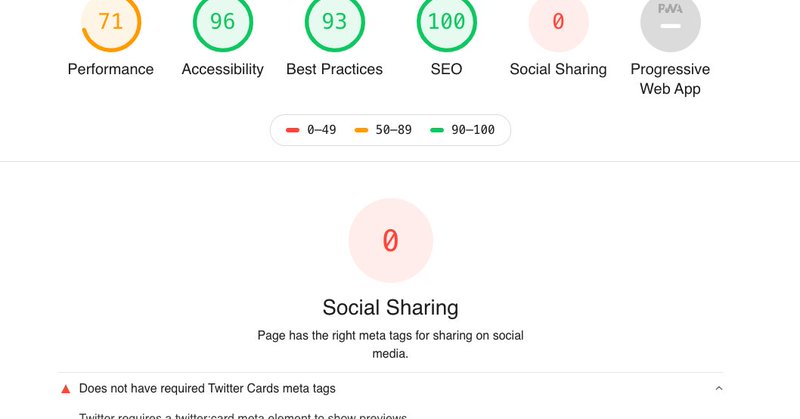
Customize Lighthouse audits with custom tests. E.g. Check for social meta tags, pages are listed in the sitemap, custom perf metrics, etc. Building custom Lighthouse audits by @DebugBear:
debugbear.com
Lighthouse natively tests site performance, accessibility and SEO. But did you know you can add custom Lighthouse audits to the site report?
0
2
5
Looking to compare Lighthouse & Chrome UX Report scores visually in a snap? Checkout PageSpeed Compare by @sanderheilbron:
0
1
2
Make a custom CrUX (Chrome UX Report) Dashboard shortcut in Chrome by @rick_viscomi: https://t.co/wxF2JyuCJE
#webperf

dev.to
A short walkthrough of setting up a Chrome search shortcut to launch a custom CrUX Dashboard
0
3
2

You want to run a test with WebPageTest but the waiting is long? Check https://t.co/gQfIWG6DWz to choose a free or less used resource (browser/location). #webperf #tip
1
7
6
More detailed information on why you should self-host your static assets by @csswizardry: https://t.co/Uei77Yhyv2
0
0
0