

uizard ✨ by Miro Labs
@uizard
Followers
19K
Following
1K
Media
444
Statuses
1K
Visualize product ideas fast and easy with AI ✨ Create, validate, and communicate design concepts in minutes, not days. Empower your product team with #Uizard
Joined May 2017
✨ Next level generative UI design is here ✨ The most popular UI generator just got even better! With Autodesigner 2.0, type out your ideas in plain text to design, prototype and iterate in seconds. #autodesigner #uizard #generativeui
8
9
68
"Uizard is getting out hand..." What a quote from the awesome Elizabeth from DesignerUp 😜 Watch how you can now create and iterate on your designs using text prompts in real-time. Check it out below: https://t.co/qtAp6bxMjZ
https://t.co/qtAp6bxMjZ
6
0
10
💬 What would you like to design today? 💬 With Autodesigner 2.0, you can type out your ideas in plain text to design, prototype, and iterate in seconds. Read more about text to design and what Uizard's Autodesigner can do here: https://t.co/jXd4S1kheg
https://t.co/jXd4S1kheg
uizard.io
Generate multi-screen, editable designs and iterate them using text prompts. Advance Uizard projects with a UI generator directly from the editor.
1
0
5

Today we launched Autodesigner 2.0 — our most advanced design AI engine yet! What can it do? Time for a 🧵
30
77
780
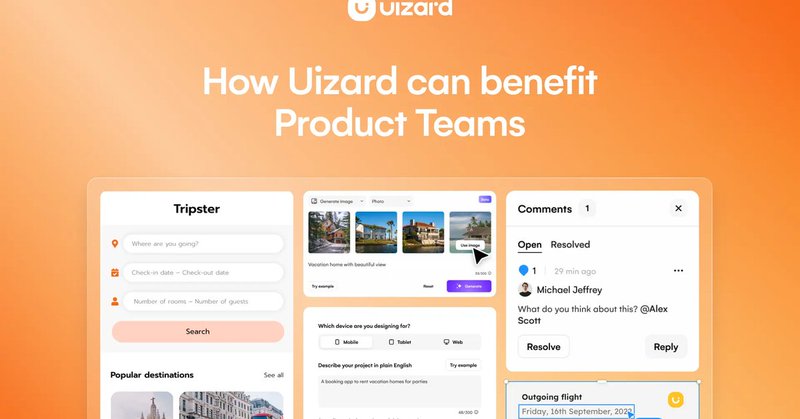
Product teams strive for ways to streamline ideation, collaboration, and development processes. They're frequently faced with prolonged discovery and iteration phases, tiresome communication with stakeholders, and the time-consuming intricacies of design https://t.co/DVGezQT8Yv
uizard.io
How can Uizard benefit your product team, speed up design processes and improve collaboration and communication? Read on to find out more.
0
0
1
Ideal for ideation sessions or testing out new design themes, Theme Generator allows you and your team to easily switch up the aesthetic of your Uizard project. Speed up ideation and quickly visualize your ideas, with Theme Generator and Uizard's whole host of magic features.
2
1
5
Stop wasting time manually creating a digital version of your hand drawn wireframe. With @uizard 's Wireframe Scanner, you can simply upload a photo of your sketch, and then edit the results in the easy-to-use Uizard editor to create a high fidelity mockup. Awesome, right? 🧙♂️
1
2
7
💬 What our users say about us 💬 Here's is what some of our awesome users have to say about Uizard. We love hearing you use Uizard improve your workflow and go from idea to prototype faster than ever before 🤯 How has Uizard improved your workflow? Let us know below 👇
0
1
4
Thank you to all of our awesome users who are using Uizardd to supercharge their workflow and go from idea to product design in minutes. Stay tuned for exciting new features and updates, coming soon! #uizard #aidesign #productdesign
0
0
1
Celebrating three million Uizard users! 🎉 Wow! What a milestone! We’re growing at speed as more and more people realize the true potential of Uizard’s AI magic and easy-to-use platform, making product ideation, iteration, and creation easier than ever before.
2
1
10
Text prompts 🤝 UI designs Visualize your ideas in seconds with Uizard's Autodesigner. All you need to do is type in a text prompt to generate a new screen, and then go ahead and edit it in the easy-to-use editor. You can also change the theme of the project with a text prompt
1
0
3
Switch fidelities so that you can work in the one that suits you and your team. Whether you need to focus on the blueprint, or need to present in a simplified way for stakeholders, Wireframe Mode transforms designs into digital wireframes instantly. Save time with @uizard ✨
0
0
4
Handoff mode has been created for easy access to React and CSS code 🎉 Try it today at https://t.co/swzUe641vO
#uidesign #developers #productmanagers #designtools #aidesign
0
0
1
Product managers 🤝 Uizard 🤝 Developers Uizard's handoff mode makes it easy for Developers to implement suggested changes to a digital product. Product Managers, or anyone in a product team, can easily use Uizard to demonstrate visual changes to a product.
4
2
6
Locate attention hotspots on a design screen with Focus Predictor 🔥 Select the design screen you require, and the ‘Focus Predictor’ button will appear above it. Create a heatmap of your design screen, presenting the high and low areas of user focus and attention.
0
1
5